Zoom Video Conferencing

ZOOM VIDEO COMMUNICATIONS LOGO

Recently there has been a bit of excitement in our community regarding using Zoom Video Conferencing as a gateway to reach potential audience that may not have invested in a full suite of Standard Based (H.323) v/c kit. Think of Zoom as Skype on steroids! You can set up a meeting, invite guests, and have them connect simply through their browser. There is no complicated software to install and everything works through the browser without having to install additional software, which is great for companies which have restrictions on such things.

On of the most exciting things for us is that Zoom is free, so anybody you invite to a meeting can use it. And the fact that they provide what they call a H.323 Room Connector. This optional extra can be purchased for a small price of $US49/mo and enables H.323 video conferencing units to join the meeting. Which finally means that we can connect all our v/c units and users together in one big conference!

This all sounds fantastic but there are a few caveats that you should be aware of. Firstly you need to know that DART has (for the moment) put a ban on using Zoom to dial directly into their system. The main reason for this is that the connection that Zoom creates is forced to a connection speed of 6 megabits per second. This is far to fast for DARTs front end points and causes congestion and high usage, resulting in poor experience for other users on the network. To work around this you will need to dial directly into Zoom using your H.323 device so as a result means that it is unusable with DET schools as you need to use DART to connect to them. However as you will read I have been able to work around this using two H.323 devices.

Secondly, unless your guest using the H.323 room connector and a standards based v/c unit, then they will be using their computer which mean they will also be using the webcam and microphone which is included. Generally these built in devices are fairly cheap and are designed to work with just a single person not an entire room of people, so depending on your application the results not be acceptable.

If you really want to take full advantage of what Zoom has to offer you can configure a set up in which you use two H.323 units and a video switcher such as a Tricaster. To do this you would dial the first H.323 unit into DART as you normally would and the second unit would dial into Zoom. In this scenario any schools you need to engage would be connected at the DART end and any ‘special guests’ could be connected to Zoom. Exactly who sees what is controlled by the vision switcher. However, doing this requires quit a bit of technical know how! I have personally done this with a video conference at The Powerhouse Museum and the results where similar to that of a TV broadcast. You can see for yourself HERE.

Is Zoom worth the investment ? Probably….. for $US49/mo I think it’s worth at least trying out, you may find that you have no use for it or your organisation does not have the technical ability for it, but you would not have lost much in doing so. But you may also find that your audience reach has been massively extended and the return will be far greater than the small investment.

Stephen Bancroft is an an Electrical Engineer and Computing expert, he has over twenty years experience with internet based technologies and has worked extensively with live sound and broadcast. He is currently writing technical articles exclusively for VEA.


Dialling H.323 from a mobile device.

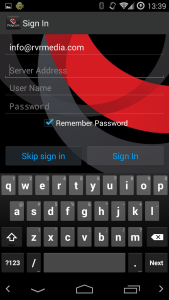
Ever wanted to join in a video conference (H.323) from a your phone or tablet? Well it is possible. Start by installing the Polycom RealPresence application for Android or iPhone. Start the application and you should be greeted with a screen similar to this. I am using Android 4.4.4 so your screen may look a little different.

2015-03-23 02.38.54

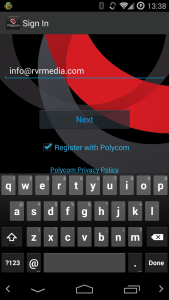
At this point just enter your email address and click next. Now you will get the following screen.

2015-03-23 02.39.05

At this point you would be forgiven for thinking that you need to sign into some sort of Polycom server or infrastructure, but you don’t need to, just click ‘Skip Sign In’ and you will get this screen.

2015-03-23 02.39.39

Now your in business, you can enter a H.323 IP and dial directly. Test it out your self by dialling one of the VTCTEST numbers.

2015-03-23 02.43.44

Enjoy !


Stephen Bancroft is an an Electrical Engineer and Computing expert, he has over twenty years experience with internet based technologies and has worked extensively with live sound and broadcast. He is currently writing technical articles exclusively for VEA.
Tandberg URI Dialing

Recently I had some fun and games with our two Tandberg Video Conference units at the Powerhouse. It had been report to me that it was not possible to dial into any VMR’s (Virtual Meeting Rooms), DARTs VMR’s included. To dial into a VMR it is necessary to use what is known as a ‘URI Dial String’, this string consists of two parts, firstly some text or a number followed by the ‘@’ symbol then an IP Address or Domain name so,  <text>@<ipaddress>, this is typically implemented by inputting the VMR as the first part of the string then the IP address as the second part.

As you would imagine not being able to dial into the DART VMR is a big problem for us, and since I am still relatively new here I am not really sure how this was achieved in the past, but I set about fixing the problem, and after much back and forth and much googling I came to the conclusion that the firmware in our Tandberg units was way too old!

As it turns out URI dialing cannot be used with Tandberg software version prior to TC4.2 unless the system is registered with a gatekeeper. We do not have a gatekeeper and you would only really need one if you had to implement inbound URI dialing. Cisco only introduced full support for H.323 Annex O (URI Dialing) in TC4.2, we had TC4.1 so could only do IP dialing. Problem is that we do not have a CISCO support contract on our VC units and getting firmware upgrades is usually done through support contract channels.

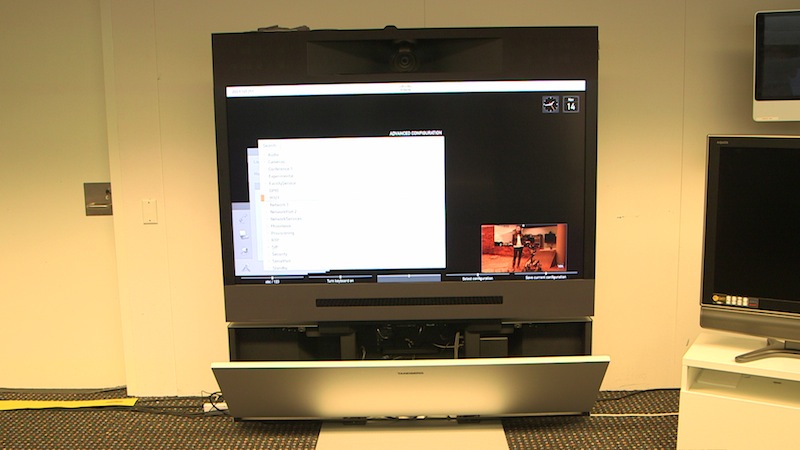
Tandberg C60 at the Powerhouse

Thankfully, if you are in the same situation, there is a way out. You can either go to the trouble of installing gnugk a free gatekeeper application on a seperate server or you can in fact get a firmware upgrade for your unit. CISCO only require that you have a support contract to get the most recent version of the firmeware TC6.3, the older versions TC4.2 and TC5.1.8 are freely avaliable HERE.  You will need a CISCO Tac login to be able to download it, but that is free as well.

There is a step-by-step process to installing a new firmware package in the administrators guide for your system. But basically you will need to;

– Download the package.
– Upload the packaged to the unit using the web interface that your unit provides.
– Wait about 10 minutes for the upgrade to finish and the system to reboot.
– Login to the CISCO Tac and obtain a Release Key from HERE.
– Login back into the web interface and apply the ‘Release Key’ from the maintenance menu.

Be warned though, a firmware upgrade like this is not for the faint hearted, things can go wrong, and if something breaks you will need advanced knowledge to recover from the situation!

So, if you’re brave, go forth, upgrade and enjoy all the new features that you never thought your VC Codec could do!